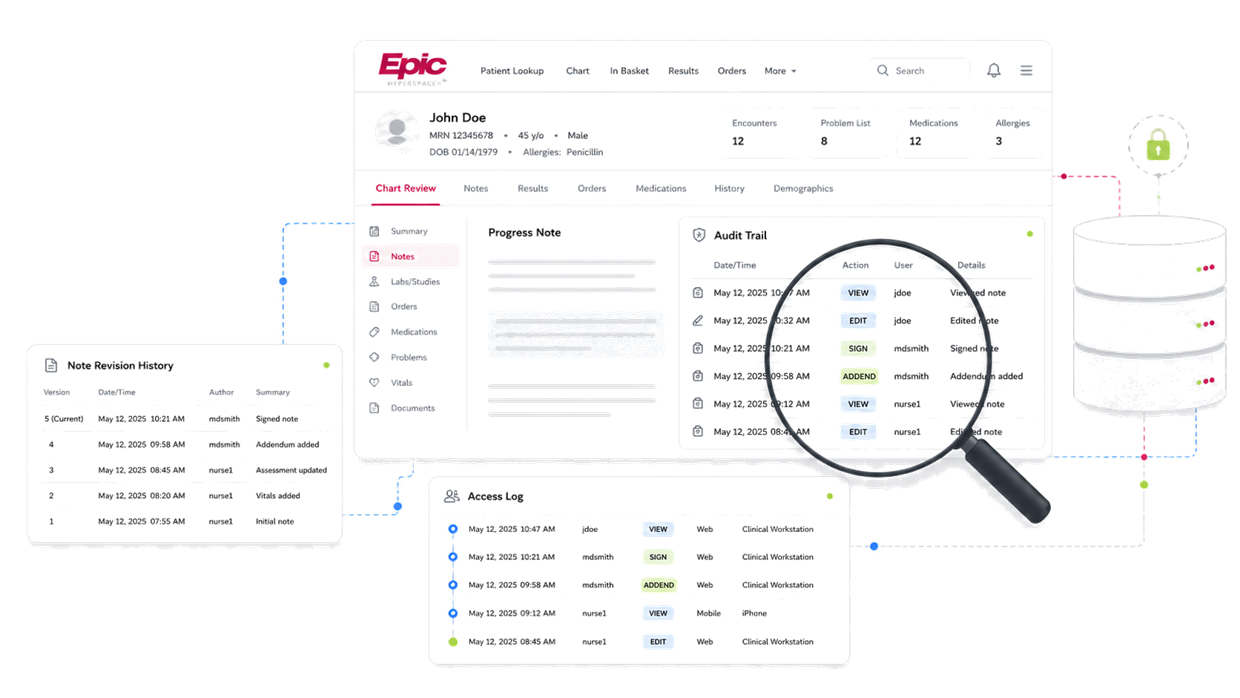
The platform landscape
Epic runs on the Chronicles database, accessed through the Hyperspace and newer Hyperdrive clients. The patient-facing chart you receive on production is an abstracted output; the forensic data — who opened the chart, when each entry was filed, and how notes were revised — is held separately and exported through Epic's reporting and audit tooling.
Audit trail & access-log reporting
- Access log / record access report
- Commonly used to show which users viewed or opened a patient's chart and when. Useful for establishing who was in the record around a disputed event.
- Audit trail report
- The action-level log — entries filed, modified, or deleted, with user and timestamp. The label and export format vary by Epic version and by how the organization configured reporting.
- Note revision / edit history
- Epic retains the editing history of clinical notes, including addenda and the times text was entered or changed. This is where backdating and after-the-fact additions surface.
Report names and behavior vary by version, module, and how the organization configured its system — capability should be assessed against the specific deployment, not assumed.
| Timestamp (UTC) | User | Action | Detail |
|---|---|---|---|
| 2024-03-11 22:47:03 | RN J. Doe | CREATE | Progress note created — status: draft |
| 2024-03-11 23:02:10 | RN J. Doe | VIEW | Vitals flowsheet opened |
| 2024-03-12 08:55:41 | Dr. A. Roe | VIEW | Progress note opened |
| 2024-03-12 09:14:55 | RN J. Doe | EDIT | Review: Progress note edited; compare retained versions to determine what changed. |
| 2024-03-12 09:15:10 | RN J. Doe | SIGN | Progress note signed |
| Disclosed addendum | Silent edit | |
|---|---|---|
| What it is | A disclosed, timestamped addition made after the note is finalized | An undisclosed change to the note's original content |
| On the printed note | Disclosed on the face of the record | Not visible — the note shows only its final state |
| In the audit log | Recorded with its own timestamp | Should surface as a logged edit after finalization |
What to demand in discovery
- Request the native Epic audit trail and access-log export for the specific patient and a defined date range — not the printed 'designated record set' or Release-of-Information output, which omits audit data entirely.
- Specify both the access log (views) and the action/modification audit; producing one is not producing the other.
- Demand note revision history, including the timestamp each note was first saved versus signed, and any addenda.
- Ask the organization to identify the Epic version and which audit reports it is technically able to run, so 'we can't produce that' can be tested against Epic's documented capabilities.
For adaptable request-for-production language — and the full set of audit-trail, metadata, and ancillary-system categories these requests should cover — see the EMR discovery guide. For the export itself, How to read an Epic audit trail — a plaintiff attorney's guide walks through reading it line by line.
Common production gaps
- Producing the abstracted legal chart in place of the audit trail — the most common substitution, and easy to miss because the output looks complete.
- Disclosing an access report (who viewed) while withholding the action audit (who changed what), or vice versa.
- Omitting note revision history so that a late or backdated entry reads as contemporaneous.
- Asserting a short audit-log retention window without supporting the claim with Epic's actual configured retention.
Hands-on Epic audit-trail review
I review Epic audit trails, access logs, and note revision history hands-on, alongside the chart as produced. That technical-side review is what turns an Epic production into findings: which entries were filed after the event they describe, which notes changed after signing, and which audit components the production left out. Epic is the most widely used EMR among large U.S. hospital systems, so it is often the platform a hospital case turns on.
Related services: record alteration and back-charting analysis, audit-trail chronology, and spoliation investigation.
Frequently asked questions
Does Epic keep an audit trail of every change to a medical record?
Epic logs access to and actions on the record at the back-end database level, including when entries are filed and when notes are edited. Exactly which audit reports an organization can produce depends on the Epic version and its reporting configuration, which is why discovery requests should ask the provider to identify its audit capabilities rather than accept a blanket 'not available.'
Why does the Epic chart we received not show late entries or edits?
The printed or exported chart is an abstracted output designed for clinical and release-of-information use. It is not the audit trail. The metadata that reveals late entries, backdating, and edits is held separately and must be requested specifically as the audit-trail and note-revision export.
What should a request for production ask for with Epic records?
Ask for the native Epic audit trail and access log for the named patient and date range, the note revision history including addenda, and identification of the Epic version and available audit reports — explicitly distinguished from the designated record set.
Guides for other EMR systems
Facing a different platform? Each guide covers that system's audit-trail reporting, what to demand in discovery, and its characteristic production gaps:
This page is technical and regulatory information, not legal advice.